How to Build a Crafting Table in Minecraft
You just spawned into a vast, blocky world with nothing but your fists and the clothes on your back. You punch a tree, grab some logs, and now you are asking: How do I turn this into tools, weapons, or shelter? The answer starts with one essential item, the crafting table. This single block unlocks nearly every recipe in Minecraft, transforming you from a survival novice into a capable builder. Without it, you are stuck making only the most basic items. In this guide, you will learn exactly how to build a crafting table in Minecraft, step by step, from chopping your first log to unlocking advanced crafting.
Gather Wood from Any Tree
To build a crafting table, you need wood, but good news: any tree works. Whether it is Oak, Spruce, Birch, Jungle, Acacia, Dark Oak, or Pale Oak, all logs are fully compatible. You do not need to hunt for a specific type.
Break Logs by Hand or Tool
Stand close to a tree trunk and hold down the left mouse button on PC, tap and hold on mobile, or press ZR or the equivalent button on console to break the log. Each broken log drops one wood block, also called a log. You only need one log to make a crafting table, so even a small tree gives you enough material.
Pro Tip: Punching logs by hand works, but using an axe speeds up harvesting significantly once you have one.
Convert Logs to Wooden Planks

Raw logs cannot be used directly. You must turn them into wooden planks, the fundamental building block of early-game crafting.
Open Your Inventory
Press E on Java Edition or I on Bedrock Edition to open your inventory. Look for the 2×2 crafting grid in the top-left corner of your inventory screen.
Craft Planks from Logs
Place one log in any slot of the 2×2 grid. The result is four wooden planks. This is a 1:4 conversion, meaning one log gives you more than enough material to build a crafting table, which only requires four planks.
Note: You can use any wood type. Mixing different planks like Oak and Spruce still makes a valid crafting table.
Craft the Crafting Table
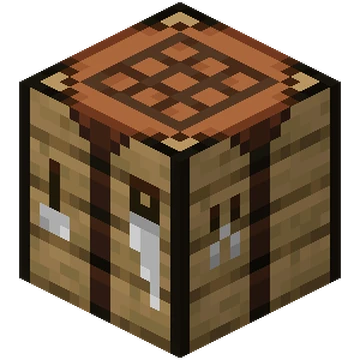
Now that you have four wooden planks, it is time to build the actual table.
Fill the 2×2 Grid with Planks
In the same 2×2 crafting area, place one plank in each of the four slots. It does not matter which type of wood you use, just fill all slots. As soon as the fourth plank is placed, the output box shows a crafting table.
Move It to Your Inventory
Click or tap the crafting table icon and drag it into your main inventory. Do not close the menu yet. If you close without taking the item, some versions may discard it.
Warning: Always retrieve the crafted item before closing your inventory to avoid losing it.
Place and Use the Crafting Table
The crafting table is not useful sitting in your inventory. It needs to be placed in the world to function.
Select and Place the Table
Put the crafting table in your hotbar. Aim at a solid block such as dirt, stone, or grass. Right-click on PC, press LT or L2 on console, or tap on mobile to place it. A wooden table appears in the world, ready for use.
Unlock the 3×3 Crafting Grid
The real power of the crafting table comes from its expanded grid.
Interact to Open Advanced Crafting
Approach the placed crafting table and right-click or use it to open a new interface. This reveals a 3×3 crafting grid, which is where the real Minecraft crafting begins.
With this grid, you can now craft:
– Tools including pickaxes, axes, shovels, and hoes
– Weapons like swords and bows
– Armor such as helmets, chestplates, and leggings
– Furnaces for smelting ores and cooking food
– Redstone components including repeaters and comparators
– Building blocks like stairs, slabs, and fences
Without this table, none of these items are possible to craft.
Why the Crafting Table Is Essential
First Step in the Tech Tree
The crafting table is the most important early-game item. It serves as the gateway to progression. Until you build one, you cannot make a pickaxe to mine stone, a sword to defend yourself at night, or a furnace to cook meat or smelt iron. Every successful base, mine, and fortress starts with this one block.
Minimal Cost, Maximum Reward
You only need one log to create four planks, which then become one crafting table. That is it. No rare materials and no complex steps are required. Yet the return on investment is massive.
Common Mistakes to Avoid

Leaving the Table in the Output Slot
New players often craft the table, see it in the result box, and close the menu, only to lose it. Always click and move the item to your inventory before closing.
Placing It in a Dangerous Spot
Do not place your crafting table outside at night. Hostile mobs like zombies and skeletons spawn in darkness. If you are running to your table and get attacked, you might lose your items or your life.
Fix: Build a small shelter first, then place the table inside.
Using the Wrong Grid
Remember that you craft the crafting table in the 2×2 personal grid in your inventory. But once placed, you use the 3×3 grid on the table itself for everything else. Do not try to make tools in your inventory 2×2 grid because they will not work.
Upgrade Your Base with Multiple Tables
Once you are past the first day, consider placing additional crafting tables at your mine shaft entrance, in your farm area, or at a nether portal outpost. This saves travel time and keeps crafting close to where you need it.
Pro Strategy: Seasoned players never rely on just one crafting table. They build them wherever efficiency matters.
Crafting Recipes You Can Now Make
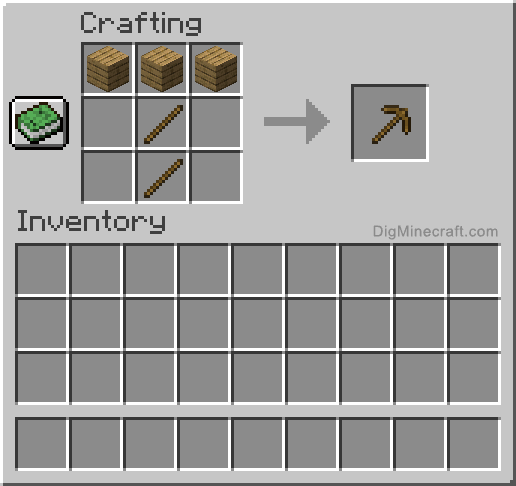
With your 3×3 grid active, here are the first essential items to craft.
Wooden Pickaxe for Mining
Craft a wooden pickaxe by placing planks in the top row across all three slots and placing sticks in the middle center and bottom center slots. This tool allows you to mine stone and unlock the next tier of resources.
Crafting Sticks from Planks
Need sticks for tools? Place one plank in the top slot and one plank in the middle slot of the crafting grid to get four sticks.
Build a Furnace to Smelt Ores
Using eight cobblestone blocks arranged in a ring with the center empty, craft a furnace. Now you can cook food and turn iron ore into usable ingots.
Maintain and Protect Your Crafting Table
Can It Be Destroyed
Yes, but that is a feature, not a bug. If you need to move or retrieve your crafting table, simply break it with your hand or any tool. It drops as an item and goes back into your inventory.
Mob-proof Tip: Place your crafting table inside a house or fence-enclosed area to prevent creepers or Endermen from destroying it.
Troubleshooting: Why Will Not It Craft
No Planks in Inventory
Double-check that you converted your log into planks. Logs and planks are different items. You cannot craft with raw logs.
Grid Not Filled
Make sure all four slots in the 2×2 grid are occupied. One empty slot means no crafting table will be produced.
Using the 3×3 Grid by Mistake
You cannot craft the crafting table on another crafting table. Use your personal 2×2 grid in your inventory to make the first one.
Frequently Asked Questions About Building a Crafting Table in Minecraft
What materials do I need to make a crafting table?
You need four wooden planks to craft a crafting table. These four planks come from a single wood log, which yields four planks when placed in any crafting grid.
Can I use any type of wood for the crafting table?
Yes, you can use any wood type including Oak, Spruce, Birch, Jungle, Acacia, Dark Oak, or Pale Oak. You can even mix different wood types in a single table if desired.
How do I access the 3×3 crafting grid?
Place the crafting table in the world, then approach it and right-click on PC, press LT or L2 on console, or tap on mobile to open the 3×3 crafting interface.
Can I move my crafting table after placing it?
Yes, simply break the crafting table with your hand or any tool. It drops as an item that you can pick up and place somewhere else.
What can I craft with a crafting table that I cannot craft in my inventory?
The 3×3 grid allows you to craft tools, weapons, armor, furnaces, redstone components, stairs, slabs, and many other essential items that are impossible to make in the 2×2 inventory grid.
Key Takeaways for Building Your First Crafting Table
Building a crafting table is the most important milestone in Minecraft survival mode. You only need one log, which converts to four planks, to craft this essential block. The crafting table unlocks the 3×3 grid that enables nearly all recipes in the game, from wooden pickaxes to furnaces and beyond. Place your first table inside a shelter near your spawn point, and consider adding more tables at mining outposts or farm areas as you expand. Now that you have mastered this fundamental step, craft that wooden pickaxe, build a furnace, and begin your journey from dirt hut to diamond fortress.